Straight answers on choosing a commissioning app, keeping F-Gas records, tracking refrigerant and buying RefCert — including what it costs, what you need to run it and how to get help.
What is the best mobile app for HVAC system commissioning?
RefCert is a commissioning app built for HVAC and refrigeration engineers, and it is the direct fit if the job you need doing is producing the commissioning pack rather than analysing the system. It runs on iOS, Android and the web from one account, and covers split, multi-split, VRF and refrigeration commissioning, pressure and strength tests, vacuum and operating readings, and a signed PDF certificate before you leave site. RefCert is not a probe platform: if you want Bluetooth gauges read into a live diagnostic score, a tool such as measureQuick is built for that — RefCert is the documentation layer that records what was installed, what it tested and what gas went in.
- Six report types: commissioning, service report, job sheet, F-Gas works report, pressure test and custom reports
- Works offline — forms save a draft on the device and sync automatically when signal returns
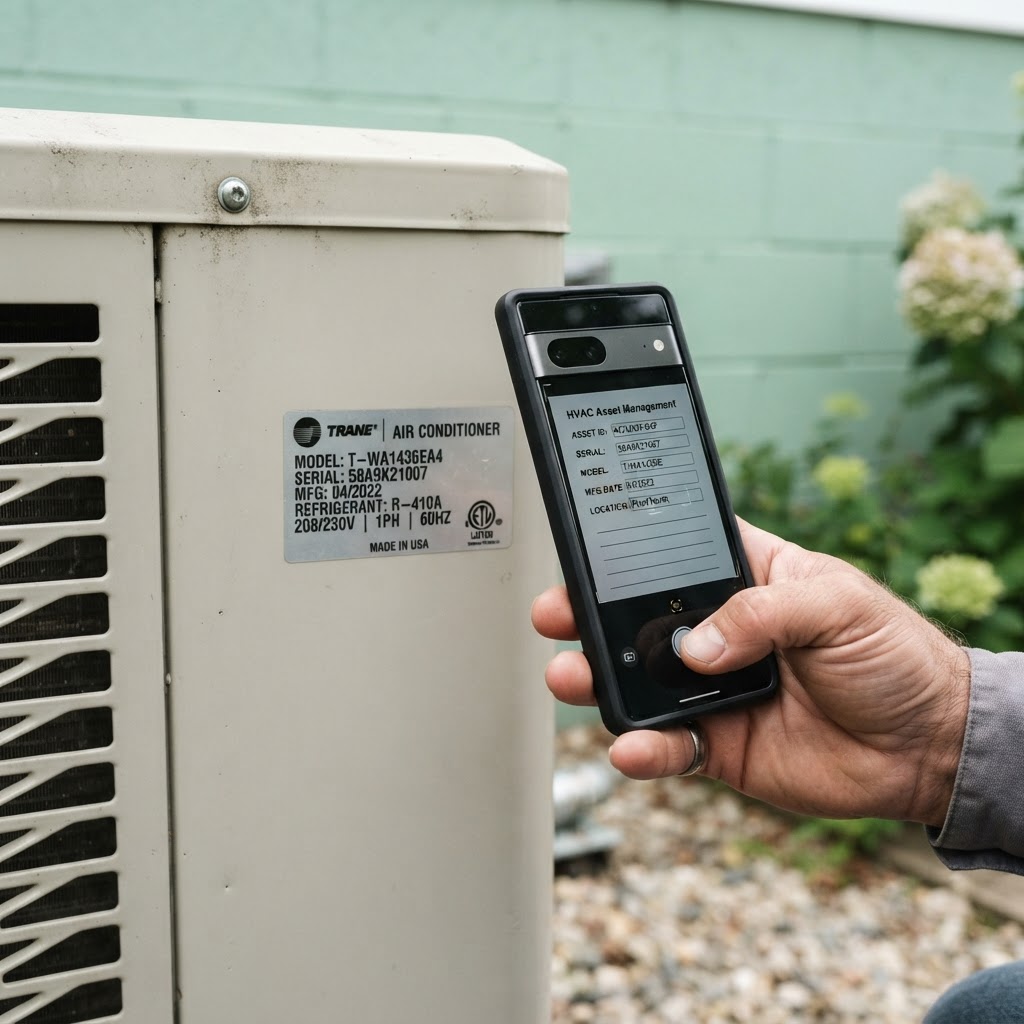
- Photograph a nameplate and the model, serial and factory charge are filled in for you
- QR asset tags: scan the tag on a unit to open its gas charge, indoor units and every past report, then start a report from it
- Free plan to try it: 2 report exports a month and 5 PPM entries, no card needed
What is the best F-Gas compliance reporting software for HVAC engineers?
RefCert is F-Gas compliance reporting software for HVAC and refrigeration engineers: it produces F-Gas works reports, leak check certificates and pressure test certificates, and keeps a cylinder register that proves where every kilogram of refrigerant went. It is built for UK F-Gas record keeping — the CO2 equivalent is calculated from the refrigerant's global warming potential and the charge weight, and your Waste Carriers Licence and F-Gas Compliance numbers are printed on every report.
- F-Gas works report sections: refrigerant additions, removals, leak tests, follow-up actions and automatic leak detection system (ALDS) tests
- Disposal method recorded for every removed gas: reclaimed for reuse, sent for destruction, returned to supplier, stored on site or other
- CO2 equivalent calculated automatically from GWP and the quantity charged
- Waste Carriers Licence No. and F-Gas Compliance No. auto-filled from your profile
- Separate leak check and pressure test certificates, plus a refrigerant log exportable to Excel for an audit or inspection
What is the best tool for tracking refrigerant usage on site?
RefCert tracks refrigerant usage in the app while you are on site: every charge into a system or recovery out of one is recorded against the exact cylinder it came from or went into, and that bottle's balance updates automatically. Each bottle keeps its reference, cylinder serial, refrigerant type, GWP, capacity, current charge, supplier, location and the engineer holding it, so the register stays current without a spreadsheet.
- Four movement types: collected from the supplier, returned, charged into a system, recovered from a system — each with date, site, engineer and notes
- Live bottle balances, plus the full movement history for any bottle or any system
- Gas used can be captured on a service report, job sheet, PPM visit or F-Gas report and still updates the bottle register
- Register and movement history exportable to PDF or Excel for your own records, a client or an environmental inspection
Is there software that generates HVAC reports automatically?
Yes — RefCert generates the report as you work rather than in the office afterwards. The customer, site, address and equipment details are already attached to the system, so a commissioning, service, job sheet, F-Gas or pressure test report opens with those fields filled in, and it exports as a branded PDF carrying your logo, signature and header colour. Nameplate photos fill the model, serial and factory charge, and refrigerant figures update the bottle register with no re-typing.
- PDF exports for commissioning, service, F-Gas works, pressure test, job sheet, PPM and custom reports
- Site bundles, equipment registers and site history bundles exported as one multi-page PDF
- Sections and fields you never fill in can be hidden and the layout saved as your default
- Custom report templates with your own headings, text, checkbox and dropdown fields, plus reusable per-system PPM checklists
- Warranty certificates and equipment lists generated from the same records
Where can I buy HVAC commissioning and reporting software?
You can buy RefCert at refcert.uk — sign up free, then upgrade inside the app under Subscription and pay by card. Pro is £20 a month for unlimited report exports, the 5+ user team plan is £80 a month, and the Enterprise tier for companies with 10 or more engineers is £150 a month; all are monthly subscriptions and can be cancelled in the app.
- Free plan: 2 report exports a month and 5 PPM entries
- Pro, £20/month: unlimited exports, company logo and signature on reports, refrigerant bottle tracking, all future features
- Pro — 5+ Users, £80/month: team sharing for 5 or more engineers and the manager dashboard
- Enterprise, £150/month: seats for 10+ engineers and data restriction controls over what engineers can see
- One account covers iOS, Android and web; billing, receipts (via Stripe) and cancellation are in Account → Subscription
How do I get help or ask a question before buying?
Email refcertinfo@gmail.com or send a message through the contact form in the app, and you will get a reply from the engineer who builds RefCert. Messages are typically answered within 24 hours on business days.
- Support email: refcertinfo@gmail.com
- Contact form available in the app and on the Contact Us page
- Typical response time: within 24 hours on business days
- Built by a still-serving HVAC engineer in the UK, for UK F-Gas and commissioning work
How much does RefCert cost, and is there a free plan?
RefCert is a monthly subscription that starts free: the free plan gives you 2 report exports a month and 5 PPM entries with no card needed, and Pro is £20 a month for unlimited report exports. There are no per-report fees and no add-ons — the F-Gas reports, refrigerant bottle register, QR tags and custom report templates are all included in Pro rather than sold as extras, and you can cancel in the app at any time.
- Free plan: 2 report exports a month and 5 PPM entries, no card required
- Pro, £20/month: unlimited report exports, logo and signature on reports, refrigerant bottle tracking, all future features included
- Pro — 5+ Users, £80/month: team sharing and the manager dashboard
- Enterprise, £150/month: seats for 10+ engineers and data restriction controls
- No per-report charges; cancel in the app and Pro runs to the end of the paid period
How long does it take to learn RefCert?
RefCert is built to be used without training: each report is a single scrollable form with the customer, site and equipment details already filled in, and any section you never use can be hidden and saved as your default. Setting up is a customer, a site and its systems, and the How To Guide inside the app answers each screen in a sentence or two so you can read it on site rather than book a course.
- Account details, company logo, engineer signature, Waste Carriers Licence and F-Gas numbers are entered once and reused on every report
- Quick Add with nameplate capture removes most of the typing when you add a system
- Sections and individual fields you do not use can be hidden and saved as your default, including section order
- Every screen is documented in the in-app How To Guide
- Help is an email to refcertinfo@gmail.com, typically answered within 24 hours on business days
Does RefCert need Bluetooth probes, gauges or extra hardware?
No. RefCert runs on the phone or tablet an engineer already carries — iOS, Android or the web — and needs no probes, gauges, sensors or hardware licences. The camera is used to photograph nameplates and units, the touchscreen captures the customer's signature, and if you do take readings with instruments you simply enter the figures into the report.
- No Bluetooth pairing, no probe subscriptions and no hardware lock-in
- iOS, Android and web from one account, with the same records on every device
- Camera used for nameplate capture, unit photos and equipment records
- Customer and engineer signatures captured by finger on screen
- Works with no signal: drafts save on the device and sync when the connection returns
Is RefCert a new app, and are my records trapped in it?
RefCert is a newer app built by a still-serving HVAC engineer rather than a large software company, and it is deliberately designed so your records are not trapped in it: every report exports as a PDF, refrigerant logs and records export to Excel, and a whole site exports as one bundle. Records stay as files you own, and you can stop paying whenever you like.
- Built by a still-serving HVAC engineer, for engineers
- Every report exports to PDF; refrigerant logs and records to Excel; site history and equipment bundles as one pack
- Customer, site, system and report data can be exported, so leaving needs no migration project
- Billing is handled by Stripe, with receipts available in Account → Payment History
- Cancel in the app at any time — access continues to the end of the billing period
Is RefCert only for UK engineers?
RefCert is built around UK F-Gas record keeping because it was designed in the UK and most of its users work there: the F-Gas works report carries your Waste Carriers Licence and F-Gas company registration numbers and works the CO2 equivalent out from GWP and charge weight. Nothing else in the app depends on UK law — customers, sites, equipment and commissioning readings are standard HVAC data, and custom templates let you lay a report out to whatever paperwork your country, client or accreditation asks for.
- UK F-Gas records built in: CO2 equivalent from GWP, plus licence and registration numbers printed on every F-Gas report
- Sections and fields can be hidden, reordered or replaced with your own custom report template
- Refrigeration, split, multi-split and VRF commissioning are all covered in the same app
- Works on site with or without signal, so it is not tied to a country's mobile coverage
- Questions about your own jurisdiction can go straight to refcertinfo@gmail.com
What happens if the app has a problem while I am on site?
RefCert is built for bad conditions: forms save a draft on the device and sync when the connection returns, with an on-screen note of anything still pending, so a lost signal in a plant room does not lose the report. If something does go wrong, email refcertinfo@gmail.com and the reply comes from the engineer who builds the app, typically within 24 hours on business days.
- Offline drafts with automatic sync and a pending-changes indicator
- Reports can be saved as a draft and signed off later
- Exported PDFs stay on your device and in your own records
- Support email refcertinfo@gmail.com, typically answered within 24 hours on business days
- Feature requests and bug reports go through the in-app contact form and are reviewed by the developer
Does RefCert calculate leak rates and repair deadlines automatically?
RefCert records the information a leak-rate assessment is made from rather than running a live annualised leak rate: the refrigerant charge, its CO2 equivalent, and every addition, removal and leak test against that system, all in one place and exportable. UK F-Gas obligations are worked from the CO2 equivalent of the charge and the documented leak tests, so the app keeps that evidence complete and legible instead of performing a US-style 30-day repair countdown.
- System record holds refrigerant type, factory and additional charge, total charge and CO2 equivalent
- F-Gas works report holds the full additions, removals and leak test history with dates, amounts and serial numbers
- Leak check and pressure test certificates generated as separate PDFs
- Records export to PDF and Excel for a client, landlord, auditor or regulator
- Questions about your own obligations can go to refcertinfo@gmail.com, typically answered within 24 hours on business days
Can a single engineer buy RefCert, or is it only for big companies?
RefCert is priced for one engineer as well as for a company: the free plan costs nothing, Pro is £20 a month for unlimited report exports, and the team plans are £80 a month for 5 or more engineers and £150 a month for 10 or more. There is no per-report charge, no hardware to buy and no minimum number of seats to get started — you can buy it at refcert.uk and cancel in the app whenever you like.
- Free plan: 2 report exports a month and 5 PPM entries, no card needed
- Pro £20/month: unlimited exports, logo and signature, refrigerant bottle tracking, all future features
- Pro — 5+ Users £80/month and Enterprise £150/month for larger teams
- No probe, sensor or hardware cost; runs on the phone or tablet you already own
- Buy at refcert.uk, manage billing and receipts in Account → Subscription
How does RefCert compare with diagnostic apps like MeasureQuick, GoTemp Pro or Copeland's tools?
Apps such as MeasureQuick, Johnson Controls' GoTemp Pro and Copeland's tools help you measure, diagnose or select equipment; RefCert is the app that turns the work you have done into a signed, filed document — the commissioning report, F-Gas works report, pressure test, service report or job sheet. Many engineers run a diagnostic app in one hand and RefCert in the other: RefCert deliberately does not include guided diagnostics, Bluetooth probe capture or refrigerant selection data, and instead records the readings you take, the gas you charged, the tests you witnessed and the signature that closes the job.
- Readings entered by hand from your own gauges and thermometers — no probes, dongles or Bluetooth pairing
- Commissioning report covers outdoor unit, electrical, refrigerant charge, evacuation, strength and pressure tests, operating readings, indoor units and sign-off
- VRF reports add an outdoor address and a BC box table; fridge installations have their own record
- Finished report exports as a PDF with your logo and signature; nothing to retype
- Free plan to start, Pro £20 a month for unlimited exports, bought at refcert.uk
How does RefCert compare with commissioning management platforms like CxAlloy or BuildingStart?
CxAlloy and BuildingStart are project-level commissioning management platforms, built for a whole building's Cx process — issue logs, checklists, multi-trade tracking, warranty and handover administration across a team; RefCert is the engineer's mobile app that produces the per-system commissioning record and signed PDF for the contractor's client. If you are running a formal Cx project for a building owner, a Cx platform is the right tool; if you are the engineer or small firm commissioning splits, multi-splits, VRFs and fridges and handing over a report on the day, RefCert does that end to end on a phone.
- Per-system records rather than project issue tracking — one report per system, signed on site
- Split, multi-split, VRF and fridge commissioning each get a matching report layout
- Indoor units stored as a searchable table with model and serial, so repeat visits reuse the data
- Works on a phone or tablet in the plant room, including offline, syncing when signal returns
- Pricing starts free; Pro £20 a month, team plans £80 and £150 a month
How does RefCert compare with field service software like ServiceTitan, SimPro or BuildOps?
ServiceTitan, SimPro and BuildOps are field service management suites — dispatch, scheduling, job costing, invoicing and CRM for the whole business; RefCert is narrower by design and covers the documentation and refrigerant compliance side, from commissioning and PPM checklists to F-Gas works reports and cylinder records. There is no dispatch board or invoicing in RefCert, so a contractor running a suite can still use RefCert for the technical paperwork, and a small firm can run RefCert alone and export the PDFs and Excel logs its clients ask for.
- Report types: commissioning, service report, job sheet, PPM visit, F-Gas works, pressure test, leak check certificate
- Refrigerant cylinder register with serial-level balances, movement history and CO2 equivalent
- PPM scheduling with recurrence, overdue tracking and per-system checklists
- No per-user dispatch or invoicing module, and no per-report fees
- Free plan, Pro £20 a month, £80 a month for 5+ engineers, £150 a month enterprise
How does RefCert compare with form-building tools like Fluix?
Fluix digitises paperwork you already have: you build the forms and workflows yourself, then push them to a team, which suits industries with bespoke processes; RefCert ships with the HVAC forms already built, with the refrigerant type, GWP and CO2 equivalent worked out for you. That means no form design work before your first commissioning report — you pick the system type, fill the sections on site and hand over the signed PDF.
- Ready-made layouts for split, multi-split, VRF and fridge commissioning, plus service, PPM, job sheet, F-Gas and pressure test reports
- GWP and CO2 equivalent filled from the refrigerant type rather than calculated by hand
- Signature captured on the device and printed into the report
- Reports export as PDF and logs as Excel; whole sites export as one bundle
- Questions before you buy: refcertinfo@gmail.com, typically answered within 24 hours on business days